
The Dell™ Axim™ X50 is a powerful handheld device with the following features: 1. Touch screen 2. Microphone 3. Infrared sensor 4. Power button 5. Wireless light 6. Reset stylus (extended) 7. CompactFlash card slot 8. Secure Digital memory card slot 9. Audio connector 10. Lanyard hook 11. Lock button 12. Reset button 13. Wireless on/off button 14. Record button 15. Battery cover 16. Battery cover lock 17. Cradle/sync cable connector 18. Home button 19. Inbox button 20. Navigator button 21. Contacts button 22. Calendar button
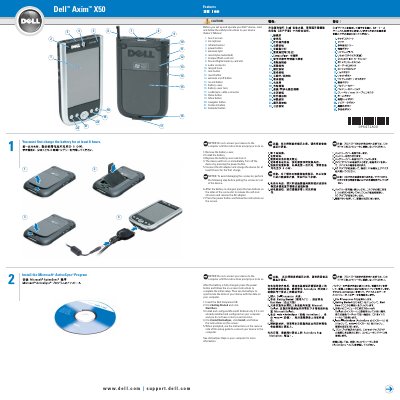
The Dell Axim X50 is a handheld device featuring a touch screen, microphone, infrared sensor, and various connectivity options including CompactFlash and Secure Digital memory card slots. The device also includes specific buttons for navigation, contacts, calendar, inbox, and recording functions.
| Memory Card Slots | CompactFlash card slot, Secure Digital memory card slot |
|---|---|
| Charging Time | at least 8 hours |
You must charge the battery for at least 8 hours before use.
The Microsoft ActiveSync program is required to synchronize data.