
Yokogawa SC72 Personal Conductivity Meter Quick Manual

The SC72 is a portable conductivity meter with the following features: 1. Measurement range: 0.001μS/cm to 100.0mS/cm 2. Autoranging 3. Temperature compensation 4. Data storage function 5. Backlit display 6. Auto power off function
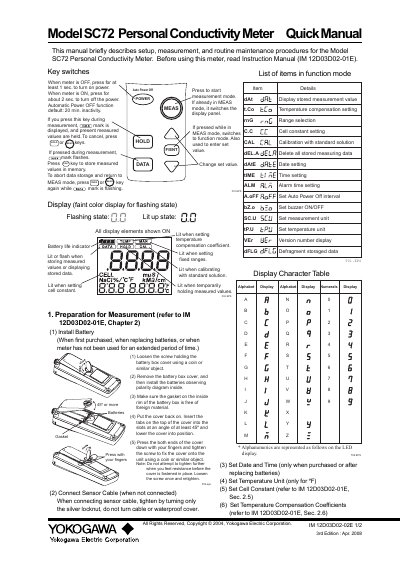

Yokogawa SC72 Personal Conductivity Meter Quick Manual - cover page
Brand
YOKOGAWA
Category
Other Electronics
Document type
Quick Start Guide
Language
English
Pages
2
File format
PDF
File size
343 KB
Published
22 November, 2023
Updated
22 November, 2023
MD5 checksum
431130023FEB765F9C34158C860C08C8

About this manual

This document provides a brief overview of the Yokogawa SC72 Personal Conductivity Meter, detailing key switch functions and essential setup steps. It instructs users on how to install batteries, connect the sensor cable, and configure basic settings such as date, time, and temperature units before beginning measurements.

What's inside

  • Key switches
  • Preparation for Measurement
  • Measurement
  • Maintenance
  • Error Messages
  • Storage

Frequently asked questions

What temperature range should the measuring liquid be?

The measuring liquid’s temperature should be between 0 and 80°C.

How should the sensor be cleaned after measurement?

Rinse the sensor with clean water, such as tap water, to remove stains.

What should be done to the sensor before storing the meter?

Wash the sensor with water before storing.

What is the default automatic power off interval?

The default is 20 min. of inactivity.

Download PDF (343 KB)

More YOKOGAWA Manuals


View all YOKOGAWA manuals →