
Dell™ Dimension™ E520 User's Manual
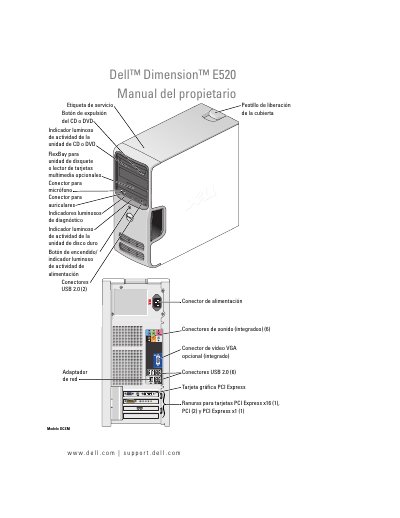
This document is the Owner's Manual for the Dell Dimension E520 desktop computer, specifically covering the optional FlexBay for floppy disk or multimedia card readers. It provides instructions for installing the computer, connecting peripherals such as printers and monitors, and configuring the system for internet use. The manual includes detailed guidance on managing power settings, including sleep and hibernation modes, and configuring RAID settings if applicable. This manual is written in Spanish.
| USB 2.0 Ports (Front) | 2 |
|---|---|
| USB 2.0 Ports (Rear) | 6 |
| PCI Express x16 Slots | 1 |
| PCI Slots | 2 |
| PCI Express x1 Slots | 1 |
| Audio Connectors | 6 (integrated) |
The FlexBay is an optional unit for a floppy disk drive or a multimedia card reader.
You can use the Service Tag located on the computer to identify it on support.dell.com.
A WARNING message indicates the possibility of hardware damage or data loss and informs how to avoid the problem.