
The Dell™ Dimension™ 9200 Owner's Manual describes the features and specifications of the Dell™ Dimension™ 9200.
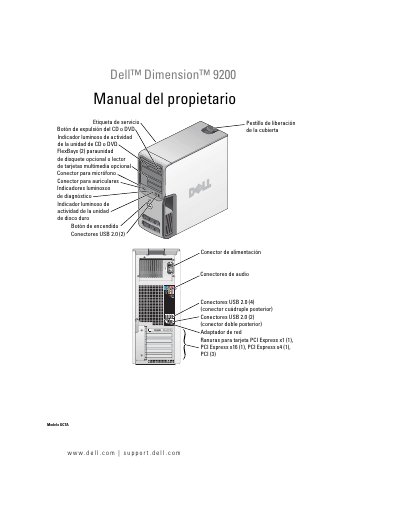
This document is the Owner's Manual for the Dell Dimension 9200 desktop computer, specifically model DCTA. It provides comprehensive instructions for setting up the system, connecting peripherals, and optimizing performance. The manual includes detailed guidance on hardware installation and removal, such as adding memory, installing hard drives, and configuring RAID. This manual is written in Spanish.
| Model | DCTA |
|---|---|
| Hard Drive Bays | 2 FlexBays |
| USB 2.0 Ports (Front) | 2 |
| USB 2.0 Ports (Rear) | 4 |
| PCI Express x1 Slots | 1 |
| PCI Express x16 Slots | 1 |
| Audio Connectors | Included |
The service tag is used to identify the computer when contacting Dell support or visiting support.dell.com.
Drivers and documentation are installed on the computer, and updates can be found on support.dell.com.