
Dell ST2420 LV/ST2421L Monitor Installation Guide

Drivers and documentation for Dell laptop, including device drivers, setup guide and user's guide.
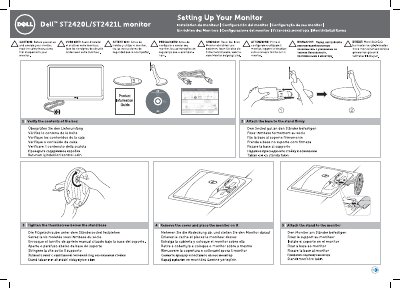

Dell ST2420 LV/ST2421L Monitor Installation Guide - cover page
Brand
DELL
Category
Monitors
Document type
Installation Guide
Language
English
Pages
2
File format
PDF
File size
1.2 MB
Published
19 November, 2023
Updated
19 November, 2023
MD5 checksum
F0F3D613AD9A3A6E6ED632CDD29380F3

About this manual

This guide provides step-by-step instructions for setting up the Dell ST2420 LV or ST2421L monitor. It covers verifying the package contents, attaching the stand base, and securing the monitor to the stand. Important safety precautions are noted before beginning the setup process.

What's inside

  • Setting Up Your Monitor
  • Verify the contents of the box
  • Attach the base to the stand
  • Tighten the thumbscrew
  • Remove the cover
  • Attach the stand to the monitor
  • Connect the monitor
  • Connect the power cable
  • Touch the power button
  • OSD Menu shortcuts

Frequently asked questions

What should you do before setting up the monitor?

Read the safety instructions.

What step involves connecting the power cable?

Connectthe power cable.

Download PDF (1.2 MB)

More DELL Manuals


View all DELL manuals →