
The Tellur Magneto is a Bluetooth headset with multiple functions and wide compatibility, providing a 100% wireless experience for music and phone calls. It is perfect for use in the office or while driving.
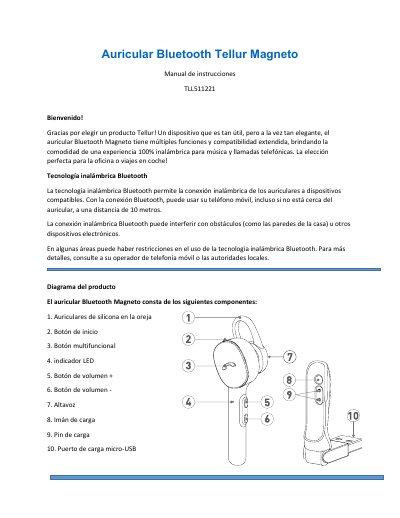
The Tellur Magneto TLL511221 is a Bluetooth headset with magnetic charging stand, offering wireless connectivity up to 10 meters, voice prompts, and multipoint controls for calls and music playback. It features a micro-USB port, magnetic charging pins, and automatic call answer/end when lifted from or placed on the charging stand.
The manual details initial charging, Bluetooth pairing steps, button functions for power, volume, calls, music, and voice assistant, as well as battery specifications (approx. 2-hour charge, 4-hour talk time, 80-hour standby). Safety tips and WEEE disposal information are included. This manual is written in Spanish.
| Bluetooth Range | 10 meters |
|---|---|
| Charging Voltage | DC5V +/- 0.25V |
| Charging Current | 100-500 mA |
| Charging Time | Approx. 2 hours |
| Talk Time | 4 hours |
| Standby Time | 80 hours |
| Charging Port | Micro-USB |
| Charging Method | Magnetic charging stand |
With the headset off, press the Start button left to enter pairing mode, then enable Bluetooth on your phone and select the headset from the device list.
Place the headset on the magnetic charging stand and connect the stand to a 5V USB charger or car USB port; the red LED lights during charging and turns white when full.
Press any button to answer a call; press the multifunction button to end a call. Lifting the headset from the charging stand auto-answers, placing it back auto-ends.
A full charge provides about 4 hours of talk time or 80 hours of standby time.