
This user manual describes the setup and use of VIVOTEK network cameras.
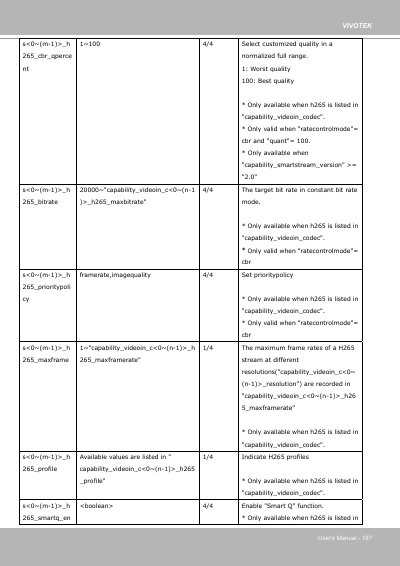
This document is the User's Manual for VIVOTEK network cameras. The provided pages form part of the URL command / parameter reference, listing video input settings for each channel and stream, including H.265 and MJPEG rate control modes, quality levels, bit rate limits, maximum frame rates and profiles.
The pages also document Smart Stream 2.0 configuration (autotracking, manual and hybrid modes with ROI quality priority), WDR Pro and WDR enhanced strength settings, AE converge speed, flickerless mode, mount types (ceiling, wall, floor), fisheye local dewarp modes, watermarking, and alternative day/night video input profiles with exposure, shutter and backlight compensation parameters.
| H.265 bit rate range (CBR mode) | 20000 to capability_videoin maxbitrate |
|---|---|
| MJPEG pre-defined quality levels | 1: Medium, 2: Standard, 3: Good, 4: Detailed, 5: Excellent |
| WDR Pro strength | 1~100 |
| Mount types | ceiling, wall, floor |
| Fisheye dewarp modes | 1O, 1P, 2P, 1R, 4R (ceiling/floor); 1O, 1P, 1R, 4R (wall) |
| Exposure time ranges | 1~32000, 5~32000, 1~8000, 5~8000 (e.g. 1s ~ 1/32000s) |
| Smart Stream quality priority | -5 to 5 (ROI vs non-ROI quality difference) |
Pre-defined levels are 1: Medium, 2: Standard, 3: Good, 4: Detailed and 5: Excellent; level 100 uses the quality in qpercent and level 99 uses qvalue.
Autotracking, manual and hybrid modes, each available only when the corresponding capability_smartstream_mode parameter is set to 1.
The mounttype parameter supports ceiling, wall and floor hardware installation.
The sensor generates one frame per exposure time, so a long exposure limits the output frame rate; for example, a 1/5s exposure yields only 5 frames per second.