
GMON Standard Version Quick Start Manual for Tanita Body Composition Scale BC-601
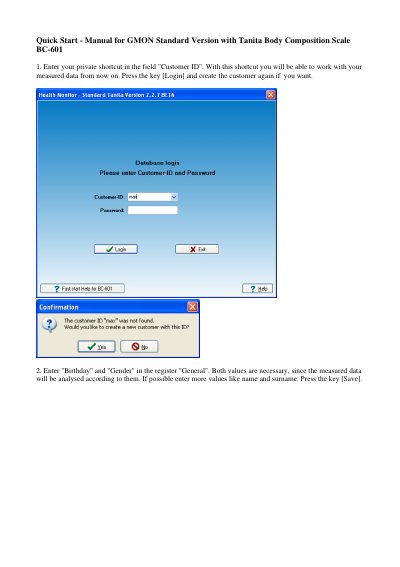
GMON Standard Version is used with a Tanita Body Composition Scale BC-601. The quick start manual describes entering a customer ID and login, recording birthday and gender in the General register, and saving the customer data.
The manual then covers using an SD-Card with a PC card reader, selecting the scale type BC 601 or using New Measure, entering personal data for each scale user, and starting a body fat analysis on the scale. Measured data saved on the SD-Card can be imported into the GMON database with Accept marked measures and then analyzed and printed in reports.
| Compatible scale | Tanita Body Composition Scale BC-601 |
|---|---|
| Scale type setting | BC 601 |
| Measurement data storage | SD-Card |
Enter your private shortcut in the Customer ID field and press Login; you can create the customer again if needed.
Birthday and gender are necessary because the measured data is analysed according to them.
Use the Accept marked measures key to save the marked measured data in the GMON database.
Insert the SD-Card into the scale, choose the user number, and start a body fat analysis.