
Key facts
- Manuals
- 1
- Languages
- EN
- Last added
- 2023-11-10
Featured GMON manuals
GMON Standard Version Body Composition Analysis Software Quick Start Manual
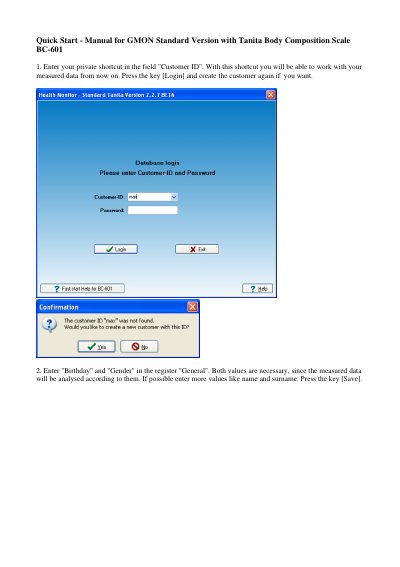
GMON Standard Version is used with a Tanita Body Composition Scale BC-601. The quick start manual describes entering a customer ID and login, recording birthday and gender in the General register, and saving the customer data.
The manual then covers using an SD-Card with a PC card reader, selecting the scale type BC 601 or using New Measure, entering personal data for each scale user, and starting a body fat analysis on the scale. Measured data saved on the SD-Card can be imported into the GMON database with Accept marked measures and then analyzed and printed in reports.
Covers: Enter customer ID and login · Enter birthday and gender · Insert SD-Card into PC card reader · Select scale type BC 601 · Enter personal data for body composition analysis · Create more users with Change User
Latest GMON manuals
GMON Standard Version Body Composition Analysis Software Quick Start Manual
Quick Start Guide 4 pages · 600 KB · ENQuick start guide for using GMON Standard Version software with a Tanita BC-601 body composition scale, from customer setup to importing measurements.
Which document do I need?
Quick Start Guide
The shortest path to a working setup, usually only a few pages.
Questions answered in GMON manuals
How do I enter a customer in GMON?
Enter your private shortcut in the Customer ID field and press Login; you can create the customer again if needed.
From: GMON Standard Version Body Composition Analysis Software Quick Start Manual
Which values are necessary for measured data analysis?
Birthday and gender are necessary because the measured data is analysed according to them.
From: GMON Standard Version Body Composition Analysis Software Quick Start Manual