
This is a user manual for the camera model YC-69P/SQ/Q/H/H1/H2/M1/M2.
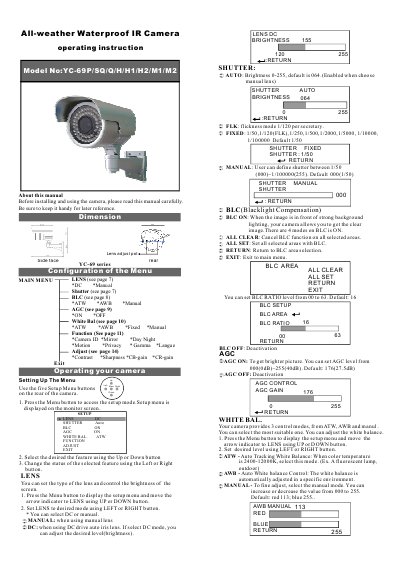
This operating instruction covers the YC-69 series all-weather waterproof IR camera, with model numbers given as YC-69P/SQ/Q/H/H1/H2/M1/M2. It explains how to use the five setup buttons on the rear of the camera to open the on-screen setup menu and change settings.
Menu sections described are LENS (DC or manual), SHUTTER (AUTO, FIXED, MANUAL), BLC (backlight compensation), AGC, WHITE BAL. (ATW, AWB, MANUAL), FUNCTION (camera ID, mirror, day/night, motion, privacy, gamma, language, reset) and ADJUST (contrast, sharpness, CB-gain, CR-gain). The document ends with an available-models table listing sensor type and resolution per model, plus specifications such as NTSC/PAL TV system, internal sync, minimum illumination with IR on, DC12V 400mA power, and size and weight.
| TV system | NTSC/PAL |
|---|---|
| Sync mode | Internal |
| Minimum illumination | 0 Lux (IR on) |
| S/N ratio | >60dB |
| AGC range | 0~40dB |
| White balance | ATW/AWB |
| Power supply voltage | DC12V |
| Power current | 400mA |
| Lens | A:3.5~8mm MI LENS |
| IR range | 40M |
| Size | 152mm*88mm*86mm |
| Weight | 1271.2g |
| Operating temperature/humidity | -10C~50C (within 85%RH) |
Press the Menu button to access the setup mode; the setup menu is shown on the monitor screen. The Up/Down buttons select a feature and the Left/Right buttons change its setting.
The camera provides three control modes: ATW, AWB and manual. In manual mode you can adjust red and blue between 000 and 255.
AGC level can be set from 000 (0dB) to 255 (40dB), with a default of 176 (27.5dB).
The specifications list a DC12V power supply with 400mA power current.