
This manual describes the functions and use of the BRE-CD sensor.
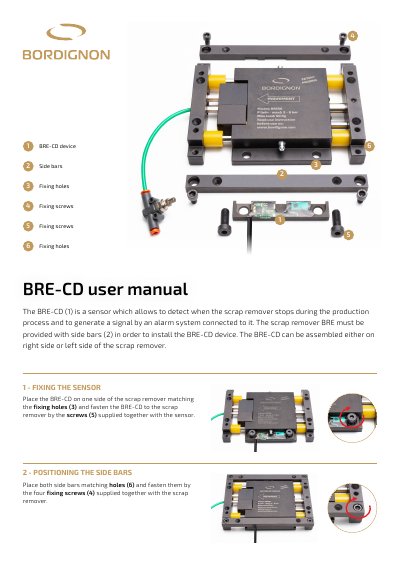
The BRE-CD is a sensor made by Bordignon that detects when the BRE scrap remover stops during the production process and generates a signal through an alarm system connected to it. This two-page user manual explains how to fix the sensor to the scrap remover, position the side bars, and connect the device by the electric wiring shown in the document.
The manual then describes checking and starting the scrap remover, setting and resetting the alarm time, the automatic reset of the alarm output, and the meaning of the green and red lights on the side of the BRE-CD.
| Power supply | 18 ÷ 26 VDC |
|---|---|
| Alarm output | OUT 50 mA max. |
| Factory alarm time | 0.2 sec. |
| Maximum alarm time | 2 sec. |
| Time increase per impulse | 0.1 sec. |
| Automatic alarm reset delay | 3 sec. after the scrap remover starts working normally |
The BRE-CD is powered by 18 to 26 VDC, with the alarm output rated at 50 mA maximum.
Close the contacts of the wh and bn wires for about 1 second per impulse; each impulse adds 0.1 sec. to the factory time of 0.2 sec., up to a maximum of 2 sec.
Close the contacts of the wh and bn wires for at least 3 seconds to restore the factory setting of 0.2 sec.
A steady green light means the BRE-CD is connected, and a steady red light means the unit is working with no alarm; a flashing red light indicates start-up or restart after an alarm.