
This is a PDF file about the quick start guide of Audio Diode, which mainly introduces how to connect Audio Diode
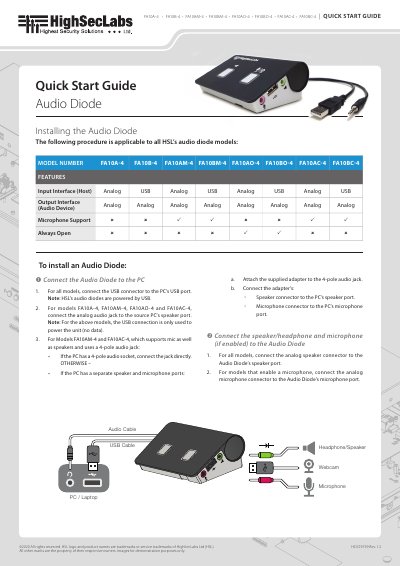
This guide covers connecting HighSecLabs Audio Diode units to a PC and to speakers, headphones, or microphones, with model-specific connection notes. It also explains the button, LED, and timed audio access behavior for models with manual speaker or microphone control.
The Audio Diode family provides unidirectional audio flow and ultrasonic frequency filtering. Supported models differ in host interface, microphone support, and whether the audio path is always open.
| Input interface (host) | Analog or USB, depending on model |
|---|---|
| Output interface (audio device) | Analog |
| Microphone support | FA10AM-4, FA10BM-4, FA10AC-4, FA10BC-4 |
| Always open | FA10AO-4, FA10BO-4 |
| Audio flow | Unidirectional |
| Power | USB |
| Timed access duration | 10 minutes |
The Audio Diode is powered by USB.
Pressing the device button connects the peripheral device for 10 minutes.
By default, the green LED indicates that the audio is closed (safe).
The red LED indicates that the speaker or microphone is open and not secure.