
Key facts
- Manuals
- 1
- Languages
- EN
- Last added
- 2023-10-31
Featured High Sec Labs manuals
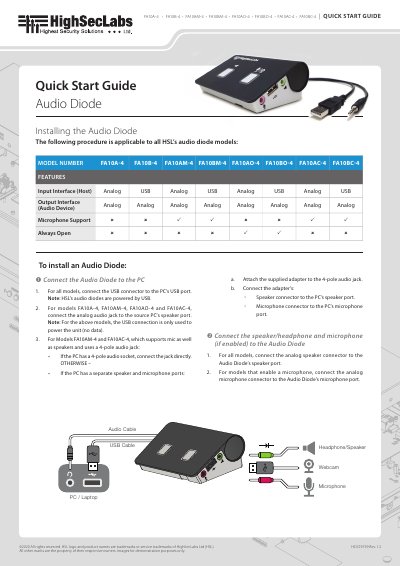
HighSecLabs Audio Diode Quick Start Guide
This guide covers connecting HighSecLabs Audio Diode units to a PC and to speakers, headphones, or microphones, with model-specific connection notes. It also explains the button, LED, and timed audio access behavior for models with manual speaker or microphone control.
The Audio Diode family provides unidirectional audio flow and ultrasonic frequency filtering. Supported models differ in host interface, microphone support, and whether the audio path is always open.
Covers: Connect the Audio Diode to the PC · Connect the speaker/headphone and microphone · Installing the Audio Diode · Operating the Audio Diode · Secure / Safe to Talk · Not Secure / Speaker & Mic Open
Latest High Sec Labs manuals
HighSecLabs Audio Diode Quick Start Guide
Quick Start Guide 2 pages · 910 KB · ENQuick start guide for installing and operating HighSecLabs Audio Diode models FA10A-4 through FA10BC-4.
Which document do I need?
Quick Start Guide
The shortest path to a working setup, usually only a few pages.
Questions answered in High Sec Labs manuals
How is the Audio Diode powered?
The Audio Diode is powered by USB.
How long does a button press keep the speaker or microphone open?
Pressing the device button connects the peripheral device for 10 minutes.