
5 Dry Contact Manual is a product manual for AKCP products, introducing the use method, function characteristics and other information of 5 Dry Contact Cable products.
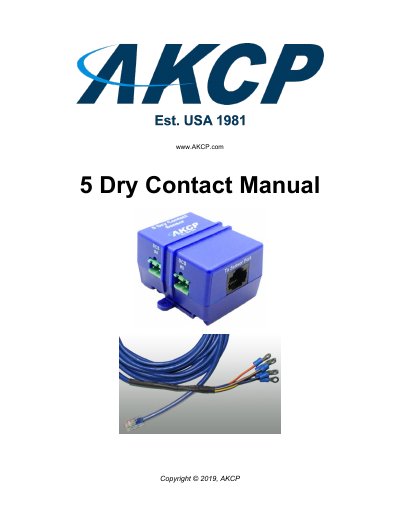
This manual describes the AKCP 5 Dry Contact Cable (5DCS), an older cabled sensor that extends the sensorProbe2 and sensorProbe2+ by allowing up to five extra dry contacts per RJ-45 port. The package contains a 15 ft 5 Dry Contact Cable and a box type dry contact module with an extension cable to the RJ-45 sensor port. The text notes that the cable version is still supported but is no longer sold, and that the newer box design uses the same web interface setup.
The guide gives step-by-step instructions for entering the license unlock code on the SP2+, connecting the sensor to an RJ-45 port, disabling auto sense, taking the port offline and selecting the 5 Input Dry Contacts from the device list. For the SP2 it explains logging in, opening the Sensors page, selecting Dry Contacts, saving the extra dry contact password and filling in contact descriptions. It also states compatibility limits and includes answers to common questions about OIDs and differences from the DCS15.
| Cable Length | 15 ft |
|---|---|
| Maximum Dry Contacts per SP2 | 10 |
| Maximum Dry Contacts per SP2+ | 20 |
| Maximum Dry Contacts per SP2+E | 15 |
| Contact Mode | Inputs only, not outputs |
| Maximum Input | 5VDC |
| Compatibility | AKCP sensorProbe2 and sensorProbe2+ base units |
| SNMP OID | sensorProbeSwitchStatus OID = 1.3.6.1.4.1.3854.1.2.2.1.18.1.3.X |
It adds up to 10 dry contacts on an SP2, 20 on an SP2+ and up to 15 on an SP2+E base unit.
The 5DCS is input only, while the DCS15 is both input and output; the 5DCS is supported only on the SP2 and SP2+ base units.
Use the same OID as for the switch sensor type or single dry contact sensor: sensorProbeSwitchStatus OID = 1.3.6.1.4.1.3854.1.2.2.1.18.1.3.X.
Yes, an unlock code must be purchased for the AKCP base unit and entered under Settings, License Management.