
This document introduces how to prepare high quality images for Hylleraas Center website, facebook, twitter and annual report
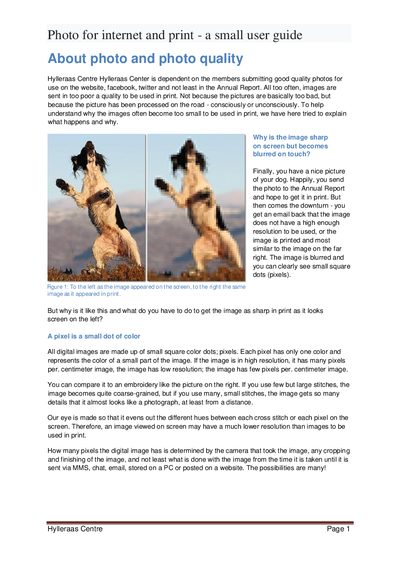
This short guide from the Hylleraas Centre explains why photos that look sharp on a screen can turn out blurred or pixelated when they are printed, and what members should do when submitting photos for the website, Facebook, Twitter and the Annual Report. It describes what a pixel is, what low and high resolution mean, and how resolution is measured in dpi/ppi.
The guide then shows how to check the file size of an image in Windows Explorer, compares JPEG with TIFF and other formats, and gives rules of thumb for how large a file should be for print (at least 1 MB, 2-3 MB for large printed images) versus for the web (50-200 KB). It closes with practical advice on copying photos from camera or phone to a PC without losing quality, sending them as email attachments or with FileSender, and keeping the original untouched.
| Recommended resolution for print | 300 dpi (300 pixels per 2.54 cm) |
|---|---|
| Minimum file size for print | At least 1 MB as JPEG |
| File size for a large printed image | At least 2-3 MB |
| File size for website or Facebook | 50-200 KB (0.05 to 0.2 MB) |
| Size of the same image stored as TIFF | 47 MB |
It should have a resolution of 300 dpi, which equals 300 pixels for every 2.54 cm of the image.
As a rule at least 1 MB in JPEG format, and 2-3 MB if the printed image is to be large.
JPEG, because it takes up the least space and most applications can open and save it.
No. A high-resolution original can always be reduced, but a low-resolution file can never be converted back to large size or high resolution.