
Sunway Home Healthcare Teleconsultation Patient User Guide. This guide provides instructions on how to make an appointment with your consultant, get ready for consultation, make payment and track medication delivery status.
This patient user guide for Sunway Home Healthcare teleconsultation explains how to book and take part in a remote consultation. To make an appointment, the patient clicks “Healthcare Unit,” selects “Sunway Home Healthcare,” chooses the service to consult on, and picks a preferred date and time before clicking “Proceed to Next Step.” The clinic will call to confirm, and after confirmation the appointment can be viewed in “My Bookings.” The consultation uses SunMed GO and can be accessed by app or browser. Before the consultation, the patient must fill the consent form, test the device for compatibility, and click “Enter Video Room.” After the consultation, the bill is ready, and the patient can click “Pay Now,” follow payment instructions, and use “Upload File” to upload the payment slip. A payment receipt is available after full payment, and a medical supplies tracking number is available once the item is out for delivery, which can be copied or tracked.
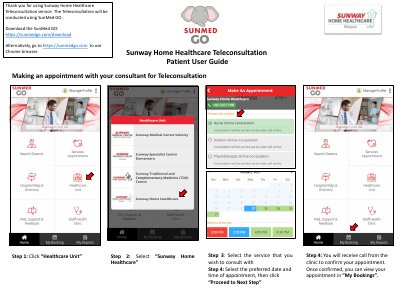
Click “Healthcare Unit,” select “Sunway Home Healthcare,” select the service to consult, and select the preferred date and time before clicking “Proceed to Next Step.” The clinic will call to confirm, and once confirmed the appointment can be viewed in “My Bookings.”
Fill the consent form before the teleconsultation, test the device for compatibility, and click “Enter Video Room” to connect with the consultant.
After the teleconsultation, the bill will be ready. Click “Pay Now,” follow the payment instruction, and click “Upload File” to upload the payment slip as proof of payment.
The medical supplies tracking number will be available as soon as the item is out for delivery. Click “Copy” to copy the tracking number and “Track Now” to be directed to the delivery tracking page.