
SIGMA-50® and SIGMA-25® are portable, low-cost, high-performance Gamma-ray energy spectrometers.
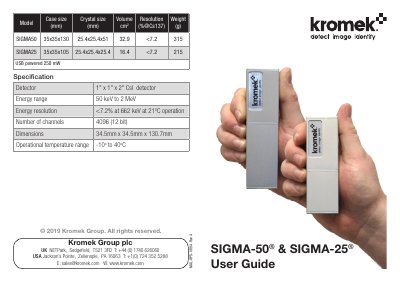
This guide explains how to use the SIGMA-50® and SIGMA-25® gamma-ray detectors with Kromek’s K-Spect® or MultiSpect Analysis® software. The detectors connect via USB to a Windows PC or tablet and require no external power. The guide covers software installation, connecting the device, setting the lower level discriminator, and acquiring spectra. The detectors feature CsI crystals with 4096 channels and operate from -10°C to 40°C.
| Energy range | 50 keV to 2 MeV |
|---|---|
| Energy resolution | <7.2% at 662 keV at 21OC operation |
| Number of channels | 4096 (12 bit) |
| Dimensions | 34.5mm x 34.5mm x 130.7mm |
| Operational temperature range | -10°C to 40°C |
Connect the SIGMA-50 to the computer USB port using the supplied cable. Any standard USB cable with a mini-B 5-pin connector will work.
You need Kromek’s K-Spect® or MultiSpect Analysis® software, which runs on Windows 7, 8, or 10. K-Spect is free to download.
Allow the unit to stabilize for about one minute before use to ensure best performance.