
Key facts
- Manuals
- 1
- Languages
- EN
- Last added
- 2023-10-27
Featured Kromek manuals
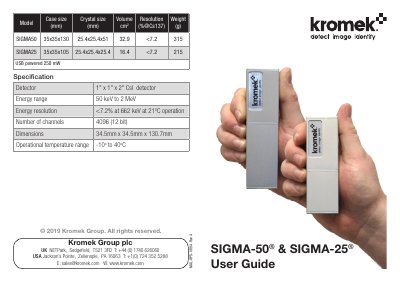
Kromek SIGMA-50® & SIGMA-25® User Guide
This guide explains how to use the SIGMA-50® and SIGMA-25® gamma-ray detectors with Kromek’s K-Spect® or MultiSpect Analysis® software. The detectors connect via USB to a Windows PC or tablet and require no external power. The guide covers software installation, connecting the device, setting the lower level discriminator, and acquiring spectra. The detectors feature CsI crystals with 4096 channels and operate from -10°C to 40°C.
Covers: Software Installation · Connecting the Detector · Setting LLD · Acquiring Spectra · Software Help
Latest Kromek manuals
Kromek SIGMA-50® & SIGMA-25® User Guide
User Manual 2 pages · 493 KB · ENUser guide for Kromek's SIGMA-50® and SIGMA-25® gamma-ray detectors, including setup, software, and operation instructions.
Which document do I need?
User Manual
Day-to-day operation, settings and troubleshooting. Start here if the product is already set up.
Questions answered in Kromek manuals
How do I connect the SIGMA-50 to my computer?
Connect the SIGMA-50 to the computer USB port using the supplied cable. Any standard USB cable with a mini-B 5-pin connector will work.
What software do I need to use the SIGMA-50?
You need Kromek’s K-Spect® or MultiSpect Analysis® software, which runs on Windows 7, 8, or 10. K-Spect is free to download.