
This document is the user manual of Lock'er Down D153 electronic lock
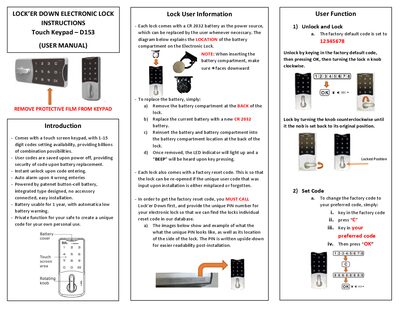
The D153 electronic lock uses a touch keypad with 1‑15 digit codes. The factory default code is 12345678; you can unlock by entering this code, pressing OK, and turning the knob clockwise. To change the code, enter the factory code, press “C”, input your new code, and press OK. The lock stores user codes even when power is removed and provides instant unlock and an auto alarm after four wrong entries.
Each lock includes a CR2032 battery that lasts about one year and gives a low‑battery warning. Battery replacement is done by removing the back compartment, swapping in a new CR2032 cell, and reinserting the compartment. If the user code is forgotten, a factory reset code can be obtained by calling Lock'er Down with the lock’s unique PIN.
| Battery type | CR2032 |
|---|---|
| Battery life | 1 year |
| Code length | 1‑15 digits |
| Factory default code | 12345678 |
| Auto alarm trigger | 4 wrong entries |
| User code retention | Saved on power off |
Enter the factory code, press “C”, type your new code, and press OK.
Remove the back battery compartment, replace the CR2032 cell, and reinsert the compartment.
Call Lock'er Down with the lock’s unique PIN number to retrieve the reset code from their database.