
Mood Media Harmony Music Player Installation Guide

This is an installation guide that describes how to connect Mood Media's Harmony Music Player to an Aaron's DJ System.
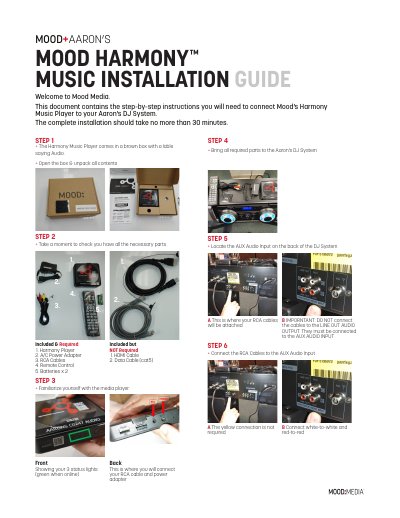

Mood Media Harmony Music Player Installation Guide - cover page
Brand
Mood Media
Category
Other Electronics
Document type
Installation Guide
Language
English
Pages
2
File format
PDF
File size
1.7 MB
Published
26 October, 2023
Updated
26 October, 2023
MD5 checksum
5747F4E0A7BFB4817345B2A71BF3EFC5

About this manual

This guide provides instructions for installing the Mood Media Harmony Music Player into an Aaron's DJ System. The process involves unpacking the device, connecting RCA cables to the correct audio inputs on both the player and the DJ system, and powering the unit up. The installation is designed to take no more than 30 minutes.

What's inside

  • Included & Required
  • Front Showing your 3 status lights
  • STEP 1
  • STEP 2
  • STEP 3
  • STEP 4
  • STEP 5
  • STEP 6
  • STEP 7
  • STEP 8

Specifications

Installation Timeno more than 30 minutes
Boot-up Timeno more than 1 minute
Batteriesx 2

Frequently asked questions

What is the maximum installation time?

The complete installation should take no more than 30 minutes.

How long does the boot-up process take?

Boot-up takes no more than 1 minute.

How do you confirm a successful WiFi connection?

You will see the 3 LED status lights illuminated in green.

Download PDF (1.7 MB)

More Mood Media Manuals


View all Mood Media manuals →