
Key facts
- Manuals
- 2
- Languages
- EN
- Last added
- 2023-10-26
Featured Mood Media manuals
MoodMedia Harmony Music & Messaging User Guide
This guide explains how to use the Harmony platform for managing music and messaging. Users can create and customize mixes and stations using seed songs, set schedules for playback, and control playback behavior. The interface includes a side menu, library view, and playlist management tools.
Key features include mood-based mix creation, seed song-based station generation, scheduling options, and playlist prioritization. Users can preview tracks, save changes, and manage playback settings including silence intervals and override permissions.
Covers: User Onboarding · User Interface · Add a Mix · Add a Station · Playlist Management · Schedule Music
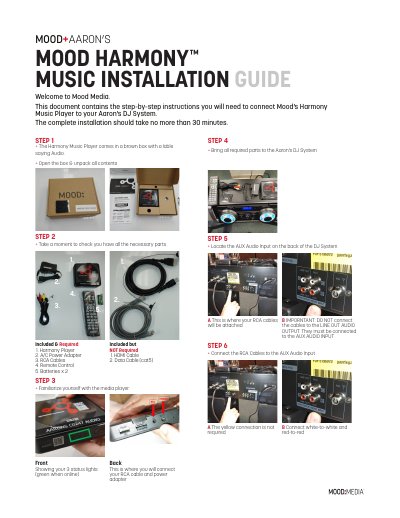
Mood Media Harmony Music Player Installation Guide
This guide provides instructions for installing the Mood Media Harmony Music Player into an Aaron's DJ System. The process involves unpacking the device, connecting RCA cables to the correct audio inputs on both the player and the DJ system, and powering the unit up. The installation is designed to take no more than 30 minutes.
Covers: Included & Required · Front Showing your 3 status lights · STEP 1 · STEP 2 · STEP 3 · STEP 4
Latest Mood Media manuals
MoodMedia Harmony Music & Messaging User Guide
User Manual 31 pages · 5.3 MB · ENUser guide for the Harmony music and messaging platform by MoodMedia, covering library management, mix creation, station setup, and playlist scheduling.
Mood Media Harmony Music Player Installation Guide
Installation Guide 2 pages · 1.7 MB · ENStep-by-step instructions for installing the Mood Media Harmony Music Player with an Aaron's DJ System, including wiring and mounting.
Which document do I need?
User Manual
Day-to-day operation, settings and troubleshooting. Start here if the product is already set up.
Installation Guide
Mounting, wiring and first power-up. Read it before the hardware goes in.
Questions answered in Mood Media manuals
How do I add a mix?
Click the red '+' button in the upper right corner, then select 'Add a Mix'.
What are the moods in a mix?
There are five moods that can be adjusted to influence the type of songs played, such as happy or angry.
What is the maximum installation time?
The complete installation should take no more than 30 minutes.
How long does the boot-up process take?
Boot-up takes no more than 1 minute.