
Instruction manual for installing Philips MP90 on GE Healthcare Aisys Carestation.
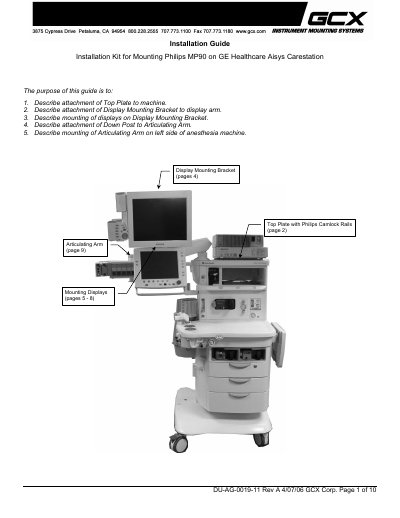
This guide details how to install the Philips MP90 on a GE Healthcare Aisys Carestation using a GCX Corp. mounting kit. It covers attaching the top plate, display mounting bracket, displays, articulating arm, and down post. Tools required include a Phillips screwdriver, hex wrenches, and specific screws. The guide references additional kits for different display sizes and includes installation notes for compatibility and mounting procedures.
To describe attachment of Top Plate to machine, Display Mounting Bracket to display arm, mounting of displays, attachment of Down Post to Articulating Arm, and mounting of Articulating Arm on left side of anesthesia machine.
A Phillips screwdriver and a 3/16'' hex wrench are required.
Three M5 x 18mm FHMS screws are used to fasten the Top Plate to the machine.
M6 x 16mm Socket Head Cap Screws are used to mount the Display Mounting Bracket to the display arm.