
Key facts
- Manuals
- 1
- Languages
- EN
- Last added
- 2023-10-26
Featured GCX Corp. manuals
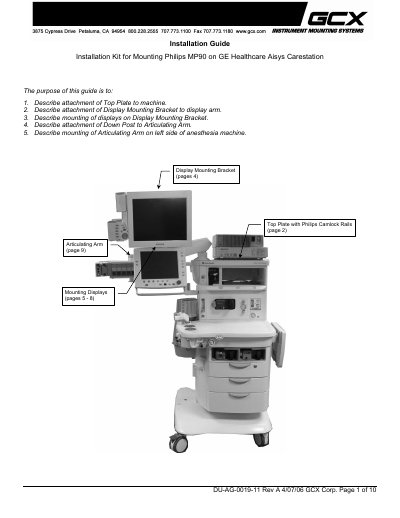
GCX Corp. Philips MP90 Installation Guide for GE Healthcare Aisys Carestation
This guide details how to install the Philips MP90 on a GE Healthcare Aisys Carestation using a GCX Corp. mounting kit. It covers attaching the top plate, display mounting bracket, displays, articulating arm, and down post. Tools required include a Phillips screwdriver, hex wrenches, and specific screws. The guide references additional kits for different display sizes and includes installation notes for compatibility and mounting procedures.
Covers: Attaching Top Plate to Anesthesia Machine · Attaching Display Mounting Bracket to Display Arm · Mounting Displays · Attaching Down Post to Articulating Arm · Mounting Articulating Arm on Left Side of Anesthesia Machine
Latest GCX Corp. manuals
GCX Corp. Philips MP90 Installation Guide for GE Healthcare Aisys Carestation
Installation Guide 10 pages · 2.8 MB · ENInstallation guide for mounting Philips MP90 on GE Healthcare Aisys Carestation using GCX Corp. mounting kit.
Which document do I need?
Installation Guide
Mounting, wiring and first power-up. Read it before the hardware goes in.
Questions answered in GCX Corp. manuals
What is the purpose of this installation guide?
To describe attachment of Top Plate to machine, Display Mounting Bracket to display arm, mounting of displays, attachment of Down Post to Articulating Arm, and mounting of Articulating Arm on left side of anesthesia machine.
From: GCX Corp. Philips MP90 Installation Guide for GE Healthcare Aisys Carestation
What tools are required to attach the Top Plate to the anesthesia machine?
A Phillips screwdriver and a 3/16'' hex wrench are required.
From: GCX Corp. Philips MP90 Installation Guide for GE Healthcare Aisys Carestation