
This is a user manual for Battery-Box Premium LV BMU (Battery Management Unit) provided by BYD
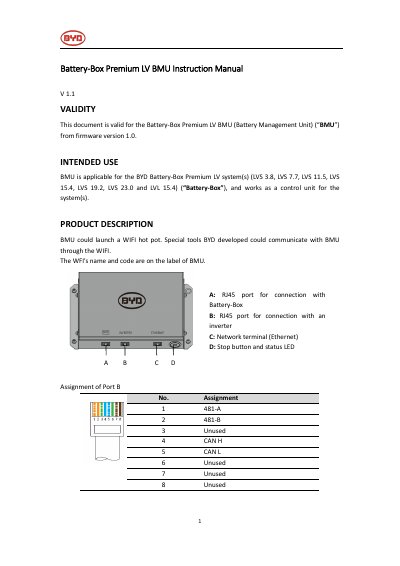
This manual provides instructions for installing and operating the BYD Battery-Box Premium LV BMU, a control unit for compatible battery systems. It details port assignments, LED indicators for system status, mounting requirements, and connection guidelines. Technical specifications include input voltage, dimensions, and environmental tolerances. Firmware updates require the BMU to operate with the Battery-Box.
| Input voltage | 40-60 V |
|---|---|
| Input current | 200 mA |
| Weight | 1 kg |
| Dimensions | 250 mm×122 mm×50 mm |
| Ambient temperature | -10 °C |
| Relative humidity | 5% to 85% |
| Degree of protection | IP21 |
It indicates that the BMU and Battery-Box are initiating.
The communication cable cannot exceed 10 meters.
It is powered by the Battery-Box through the network cable.
Mount the BMU on the wall or a rack with M4 ×12 expansion screws, at least 50 mm from the ground.