
Describes the basic information of BYD Battery-Box Premium LV BMU (Battery Management Unit) including applicable range, product description, specifications, installation methods and connection methods
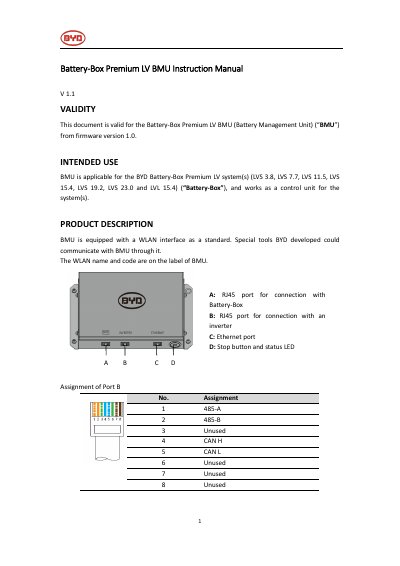
This manual provides instructions for installing and operating the BYD Battery-Box Premium LV BMU, including connection guidelines, mounting, commissioning steps, and LED status indicators. It also covers firmware updates and disposal instructions. The BMU communicates via Ethernet, CAN, and RS485 and is powered by the Battery-Box through a network cable.
| Input voltage | 40-60 V |
|---|---|
| Input current | 200 mA |
| Weight | 1 kg |
| Dimensions | 250 mm×122 mm×50 mm |
| Ambient temperature | -10°C to 50°C |
| Relative humidity | 5% to 85% |
| Degree of protection | IP21 |
| Communication | Ethernet/CAN/RS 485 |
The input voltage range is 40-60 V.
Ensure correct connections between inverter, Battery-Box, and BMU, then press the Start Button on Battery-Box for 3 seconds.
Firmware can only be updated when the BMU operates with the Battery-Box. Refer to the Battery-Box Operating Manual for further information.