
Premier Elite SmartKey User Guide, Premier Elite SmartKey is a key that can be used for Texecom prox enabled products. It has anti-theft alarm function.
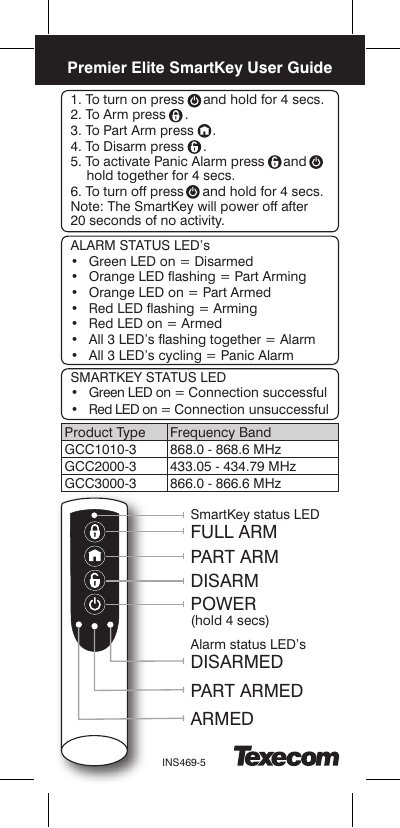
This guide explains how to operate the Texecom INS469-5 SmartKey, including arming, disarming, and activating panic alarms using button presses and LED indicators. It also covers proximity functionality for use with compatible Texecom and Ricochet systems.
The SmartKey includes battery safety instructions and compliance with standards like PD6662:2010 and EN50131-3:2009. It is not a complete alarm system and comes with a 2-year warranty excluding the battery. This manual is written in Chinese.
| Frequency Band | GCC1010-3: 868.0 - 868.6 MHz |
|---|---|
| Battery Type | 3V Lithium CR2 |
| Standards | PD6662:2010, EN50131-1:2009, EN50131-3:2009, EN50131-5-3 Grade 2 Class II |
| Warranty | 2 years (excludes battery) |
Press and hold the buttons together for 4 seconds.
Connection successful.
Only replace battery with 3V Lithium CR2.
No, it excludes Premier Elite iXP-W.