
This is a Wi-Fi smart valve controller manual that introduces how to install and use the product
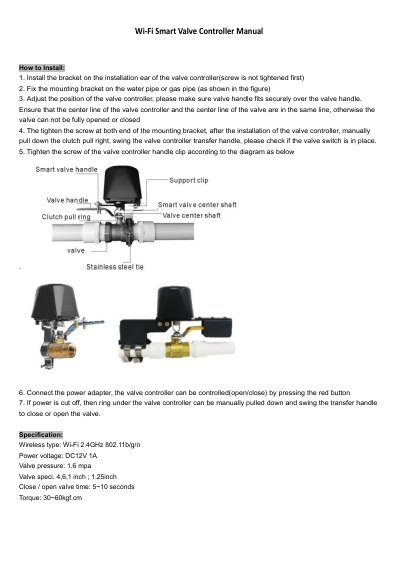
This document serves as an installation and user guide for the Wi-Fi Smart Valve Controller. It details the step-by-step process for mounting the device on a valve, connecting the power adapter, and aligning the controller with the valve handle to ensure proper operation. The guide also covers manual operation in case of power failure.
| Wireless type | Wi-Fi 2.4GHz 802.11b/g/n |
|---|---|
| Power voltage | DC12V 1A |
| Valve pressure | 1.6 mpa |
| Valve specifications | 4,6,1 inch ; 1.25inch |
| Close / open valve time | 5~10 seconds |
| Torque | 30~60kgf.cm |
You need to download the Smart Life or Tuya Smart APP to control the device.
Press the Power button for about 5 seconds until the indicator light flashes quickly to enter pairing status.
Pull down the clutch pull ring and swing the valve controller's handle 90 degrees until the valve can be switched smoothly.
Yes, you can manually pull down the ring under the valve controller and swing the transfer handle to open or close the valve.