
The Moticam X3 is a portable digital microscope that connects to PCs, Macs, tablets, and smartphones for high-definition image capture. The Moticam X3 has three magnifications (0.5X, 2X, and 5X), as well as autofocus, to meet a variety of applications. The Moticam X3 also supports 1080p video recording and can be edited and shared with the MotiConnect software.
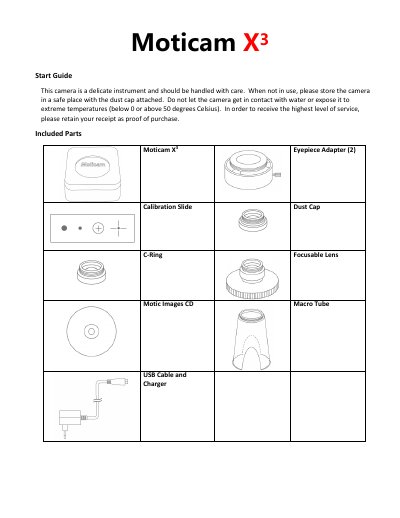
This manual explains how to set up and use the Moticam X3 portable digital microscope. It includes instructions for connecting via Wi-Fi (2.4GHz or 5GHz), using the MotiConnect app or web browser, and switching between image modes. The device requires a USB power supply and compatible devices for optimal performance. It supports resolutions up to 2592x1520 for still images and 1920x1080 for live video, with frame rates up to 30fps in 5GHz mode with H264 hardware.
The manual also covers installation of the Motic Images Plus software, attaching accessories like eyepiece adapters and macro tubes, and registering the device on the Motic Images website for support and updates.
| Sensor Size | 1/3" CMOS |
|---|---|
| Resolution (Still Mode) | 2592 x 1520 |
| Resolution (Live Mode) | 1920 x 1080 (Maximum Resolution) |
| Wi-Fi Standard | IEEE802.11b/g/n/ac |
| Working Distance | <10m |
| Power Input | DC +5V |
| Power Consumption | ≤5.0W |
| Working Temperature | 0°C ~ 50°C |
| Storage Temperature | -10°C ~ 60°C |
| Frame Rates (5GHz) | 15~30fps |
The maximum resolution for still images is 2592 x 1520, supported via MotiConnect, browser, and software.
The Moticam X3 defaults to 2.4GHz mode, which allows connection to devices without 5GHz compatibility, but with slower frame rates.