
Instructions for 1830-185 TCP/IP MANUAL MODE to RS-232 CONVERTER KIT
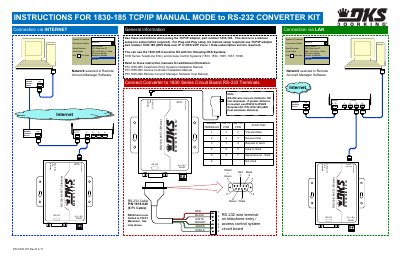
This document provides instructions for the DoorKing 1830-185 TCP/IP Manual Mode to RS-232 Converter Kit. It details the physical connections required to link the converter to the 1830 Series circuit board and a PC for programming. The kit includes an RS-232 cable (P/N 1818-040) and is designed for use with specific DoorKing telephone entry and access control systems.
| RS-232 wire run limit | 100 Ft. Maximum |
|---|---|
| Power supply | DC 5-18V |
| Ethernet speed | 10M/100M |
| Default IP Address | 192.168.1.40 |
| Default Gateway | 192.168.1.1 |
| Default Port | 1040 |
| Default Baud Rate | 19200 |
| Default User Name | admin |
| Default Password | admin |
The RS-232 wire runs are limited to 100 feet maximum.
It is compatible with the 1830 Series Telephone Entry and Access Control Systems, specifically models 1833, 1834, 1835, 1837, and 1838.