
This document introduces the operation methods of the intelligent door lock, including opening and closing the door, setting passwords, and alarm
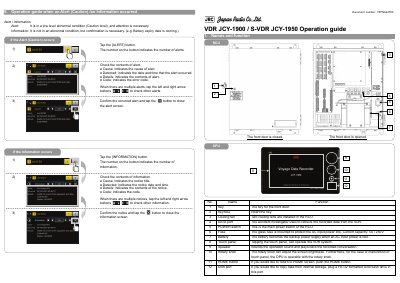
This manual explains how to operate the VDR Intelligent Door Lock, including starting and stopping the system, managing alerts and information, and preserving recorded data during maritime accidents. It details component functions and screen navigation for proper use.
The system includes a touch panel, speaker, rotary knob, and USB port for data management. Alerts and information are displayed on screen with navigation arrows. Data preservation is critical during accidents, and the system requires power to function.
Unlock and open the front door, turn on the POWER switch, wait 2 minutes, ensure MCB’s LED lights up green, then close and lock the door.
Tap the [ALERT] button to view the alert details, use left/right arrows to navigate multiple alerts, then tap the button to close the screen.
Tap the [PROTECT] button in the 'Save the recorded data at marine accident case' screen, confirm the accident time, tap [Protect], then tap [Save] in the HOME screen.