
This is a product manual for Romeo 5 red dot sight
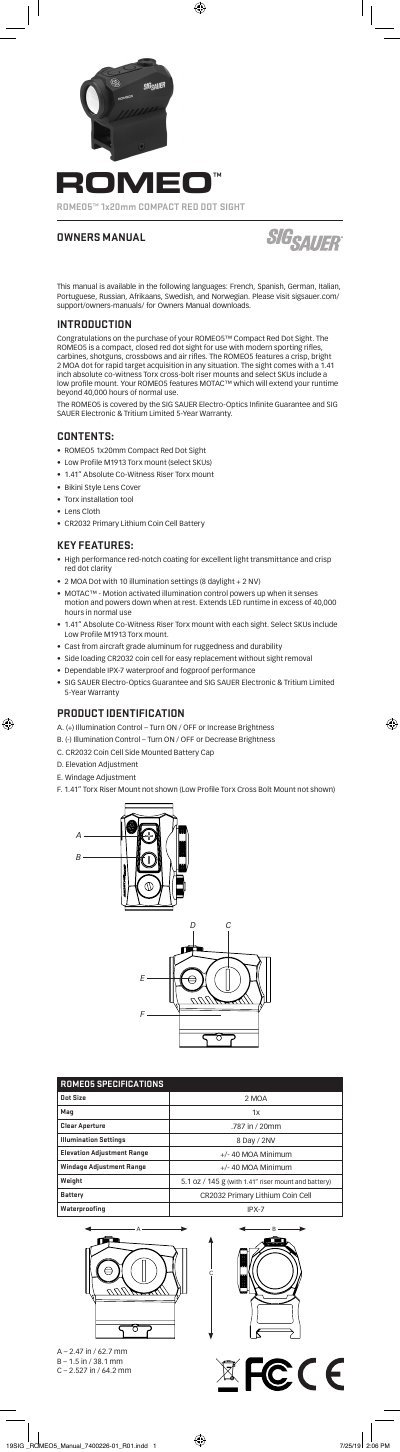
This manual provides step-by-step instructions for installing, operating, and maintaining the SIG SAUER ROMEO5™ 1x20mm red dot sight. It includes details on battery replacement, illumination control, windage and elevation adjustments, and troubleshooting common issues. The sight features a 2 MOA dot, MOTAC™ motion-activated control, and IPX-7 waterproofing. Warranty and guarantee information is also included.
| Dot Size | 2 MOA |
|---|---|
| Clear Aperture | .787 in / 20mm |
| Illumination Settings | 8 Day / 2NV |
| Elevation Adjustment Range | +/- 40 MOA |
| Minimum Windage Adjustment Range | +/- 40 MOA |
| Weight | 5.1 oz / 145 g |
| Battery | CR2032 Primary Lithium Coin Cell |
| Waterproofing | IPX-7 |
Remove the battery cap by rotating it counter-clockwise, insert the CR2032 battery with the negative side facing inward, and reinstall the cap by rotating it clockwise until finger tight.
Press and hold either the (+) or (-) button for longer than 1 second to turn the sight on or off.
MOTAC™ is motion-activated illumination control that powers up when it senses motion and powers down when at rest, extending LED runtime beyond 40,000 hours.
The sight is covered by the SIG SAUER Electro-Optics Infinite Guarantee and SIG SAUER Electronic & Tritium Limited 5-Year Warranty.