
This document is the user guide for NEC DTH-1-1 (BK) telephone product. It introduces the functions, usage methods, and usage precautions of the telephone product.
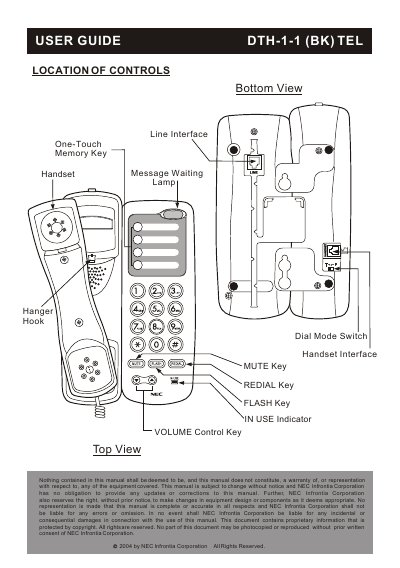
This user guide covers the NEC DTH-1-1 (BK) telephone, describing the location of controls and how to connect the line cord to a PBX/KTS phone jack. It explains dial mode selection, making calls, flash operation, volume control, ringer setup, handset mic mute, one-touch speed dial memory, last number redial, and wall mounting.
The document also lists dialing specifications and includes safety instructions plus FCC Part 68, FCC Part 15, and Industry Canada CS-03 regulatory information.
| Pulse speed | 10 pps |
|---|---|
| DTMF high group level | 0 -5.5dBm |
| DTMF low group level | 0 -7.5dBm |
| Flash time | 630 20ms |
| One-Touch Speed Dial Memory Keys | 4 |
Either T (Tone/DTMF) or P (Pulse/DP) mode is selected by the Dial Mode switch located on the bottom of the telephone.
The DTH-1-1 (BK) TEL has 4 One-Touch Speed Dial Memory Keys.
Press p to increase the volume or q to decrease the volume.
Yes, the DTH-1-1 (BK) TEL is suitable for wall mounting.