
SCT 7015 X4 Device Quick Start Guide

How to upload custom vehicle data and read vehicle strategy code using SCT Updater Software
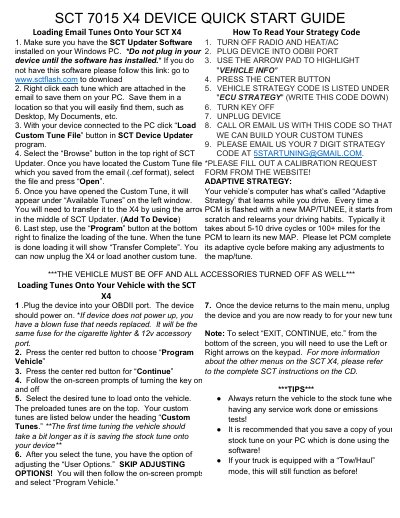

SCT 7015 X4 Device Quick Start Guide - cover page
Brand
SC&T
Category
Vehicle maintenance
Document type
Quick Start Guide
Language
English
Pages
2
File format
PDF
File size
198 KB
Published
17 October, 2023
Updated
17 October, 2023
MD5 checksum
85FF789F07130D775FF79BADDECD695E

About this manual

This guide explains how to load custom tune files (CEF format) received via email onto the SCT X4 device using the SCT Updater Software on a Windows PC. It details the steps to save files, connect the device, and transfer the tune to the unit.

What's inside

  • Loading Email Tunes
  • Reading Strategy Code
  • Loading Tunes Onto Vehicle
  • Adaptive Strategy
  • Tips

Frequently asked questions

How long does it take for the PCM to learn a new map?

It typically takes about 5-10 drive cycles or 100+ miles for the PCM to learn its new MAP.

What should be done before making adjustments to the map?

You must let the PCM complete its adaptive cycle before making any adjustments to the map/tune.

What happens if the SCT X4 device does not power up?

If the device does not power up, it indicates a blown fuse that needs to be replaced in the cigarette lighter or 12v accessory port.

Download PDF (198 KB)

More SC&T Manuals


View all SC&T manuals →