
This document is the product manual for the QS/QD series temperature controller, which introduces the basic functions, technical parameters, control methods, etc. of the temperature controller.
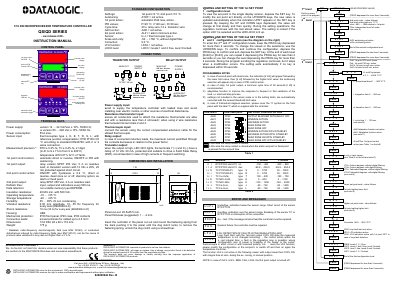
This document is the instruction manual for the Datalogic Automation QS/QD Series microprocessor temperature controller. It provides detailed information on the control panel layout, key functions, and technical specifications including power supply, sensor inputs, and measurement precision. The controller supports various thermocouple and RTD types with options for PID control and autotuning.
| Power supply | 12 … 24 Vdc/Vac ± 10%, 50/60 Hz; or 240 Vac ± 10%, 50/60 Hz |
|---|---|
| Power consumption | 5VA max. |
| Sensor input | Thermocouples J, K, E, T, R, S, L; RTD Pt100 |
| Measurement precision (RTD) | ± 0.3% fs |
| Measurement precision (TC) | ± 0.4% fs |
| Operating temperature | -10 … +55 °C |
| Dimensions | 48 x 48 x 118 mm |
| Weight | 175 g |
The input, output, and indications are refreshed every 500 ms.
A minimum cycle time of 20 seconds is recommended.
Datalogic Automation provides a warranty period of 36 months from the manufacturing date.