
QS/QD series microprocessor temperature controller 1/16 DIN Instruction manual
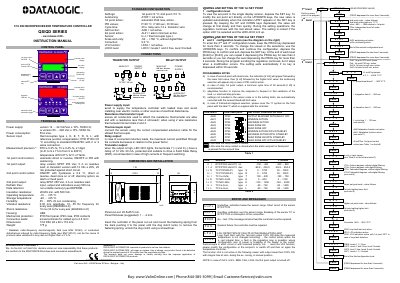
This document provides instructions for operating and programming the Datalogic Automation QS/QD series microprocessor temperature controller. It details control panel functions, technical specifications including power supply and sensor inputs, and configuration settings for both first and second point control actions. The manual also covers installation, viewing and setting parameters, error messages, and warranty information.
| Power Supply | 12…24 Vdc/Vac ±10%, 50/60 Hz; or 80…240 Vac ±10%, 50/60 Hz |
|---|---|
| Sensor Input | Thermocouples type J, K, E, T, R, S, L; RTD Pt100 Ω/0°C |
| Measurement Precision | RTD ±0.3% fs, TC ±0.4% fs, ±1 digit |
| Operating Temperature | -10 … +55 °C |
| Dimensions | 1/16 DIN; 48 x 48 x 118 mm |
The controller requires either 12–24 Vdc/Vac ±10% at 50/60 Hz or 80–240 Vac ±10% at 50/60 Hz.
It supports thermocouples types J, K, E, T, R, S, L and RTD Pt100 Ω/0°C.
The operating temperature range is -10°C to +55°C.
The first point control action can be set to automatic direct or reverse, ON/OFF, or PID with autotuning.