
This is a manual for a toy crane machine, which contains instructions on assembly, operation and maintenance
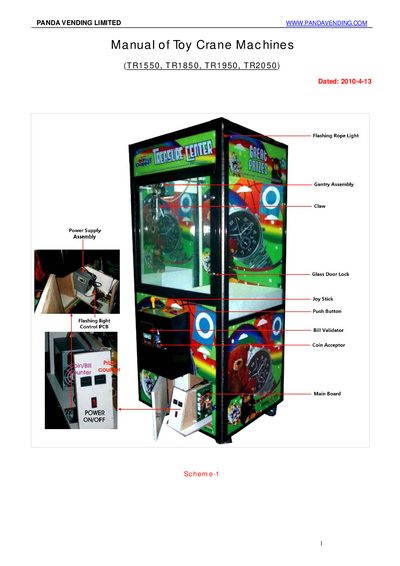
The document is a user manual for the Panda brand of toy crane machines, specifically covering models TR1550, TR1850, TR1950, and TR2050. It details the physical mounting of the console and coin acceptor setup.
The guide explains how to configure various machine functions using DIP switches on the motherboard, including settings for claw power timing, vending modes, pricing strategies, and winning ratios. It also includes a troubleshooting section with error codes related to limit switches.
| Compatible Models | TR1550, TR1850, TR1950, TR2050 |
|---|---|
| Default Strong Claw Voltage | 38V |
| Default Weak Claw Voltage | 10V |
The default strong claw setting is 38V and the weak claw setting is 10V.
Press and hold the TEST SW on the motherboard until it beeps for a 5-second countdown, then release to start a self-checking process.
Error code 02 indicates that the claw does not go down to the designated position timely and the Down-stop Limit Switch has reacted.