
This manual introduces the eFlo 2.0 touchscreen flow meter's quick setup method, including electrical connections, menu settings, and jumper settings (only for analog input).
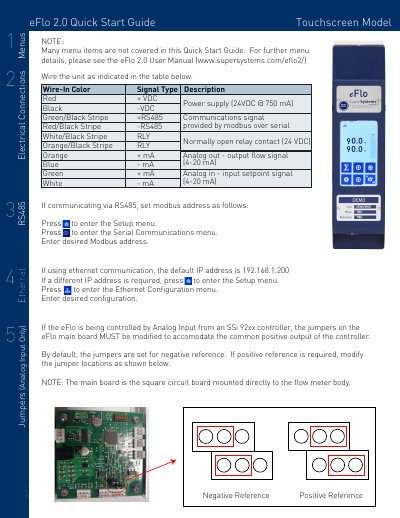
This document provides initial setup instructions for the SSi eFlo 2.0 Touchscreen Model flow meter. It details electrical wiring configurations for analog inputs (4-20 mA) and RS485 communications, including jumper settings for positive or negative reference voltage.
The guide also explains how to configure control modes between Flow mode and Valve mode, perform zero tare and max tare operations for optimal accuracy, and set altitude compensation parameters.
| Power Supply | 24VDC @ 750 mA |
|---|---|
| Analog Output Signal | 4-20 mA |
| Analog Input Signal | 4-20 mA |
| Relay Contact Voltage | 24 VDC |
The default IP address is 192.168.1.200.
Enter the Setup menu, then select Basic Configuration to change the control mode.
A max tare must be performed if the meter will be used in Valve mode.