
FlexRadio Power Genius XL Quick Start Guide

This document introduces the use of Power Genius XL 4, including installation, connection, configuration, safety information, etc.
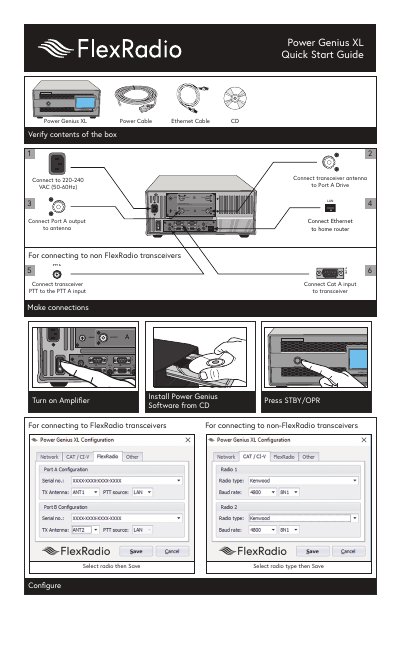

FlexRadio Power Genius XL Quick Start Guide - cover page
Brand
FlexRadio
Category
Other Electronics
Document type
Quick Start Guide
Language
English
Pages
2
File format
PDF
File size
1.3 MB
Published
15 October, 2023
Updated
15 October, 2023
MD5 checksum
A0CE45162D001AF4A80F49A1047C7B08

About this manual

The document outlines the contents of the box and the initial setup steps for the Power Genius XL amplifier. It details how to connect the transceiver antenna, power cable, and Ethernet cable to a home router. It also explains the configuration process for both FlexRadio and non-FlexRadio transceivers using the included software.

What's inside

  • Verify contents of the box
  • Connect transceiver antenna
  • Connect to 220-240 VAC
  • Connect Ethernet to home router
  • Power Genius XL Configuration
  • For Maestro users
  • For SmartSDR users
  • Safety Information

Frequently asked questions

What is the maximum operating temperature range for the Power Genius XL?

The amplifier must be placed where temperatures are between -15°C and +50°C.

What transmit delay setting is required for Maestro users?

Maestro users must set their transceiver TX Delay to 20ms.

How much does the Power Genius XL amplifier weigh?

The unit weighs 37.4 lbs (17Kg).

Download PDF (1.3 MB)

More FlexRadio Manuals


View all FlexRadio manuals →