
The document describes the features and characteristics of the Universal VR Remote Controller, which supports Android/iOS/PC, has a 360° joystick, 2 shooter keys, A, B, C, D function keys, and supports iOS/Android switch. It requires 2 AAA batteries for power.
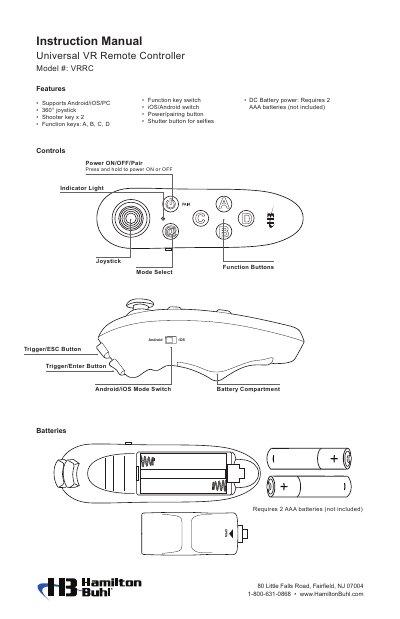
The Hamilton Buhl Model VRRC is a universal remote controller designed to support Android, iOS, and PC devices. Key features include a 360-degree joystick, two shooter keys, function keys (A, B, C, D), an iOS/Android mode switch, and a shutter button for taking selfies. The device operates using two AAA batteries which are not included in the package.
| Battery Type | 2 AAA batteries (not included) |
|---|---|
| Supported Platforms | Android/iOS/PC |
Press and hold the Power/Pair button until the indicator flashes blue, then select VR BOX in your Bluetooth settings.
Press and hold the Power/Pair button for 5 seconds.
In VR mode, the joystick controls movement.