
This document is a user manual for the SPECTRUM MK350 spectrometer, providing specifications and functions of the product.
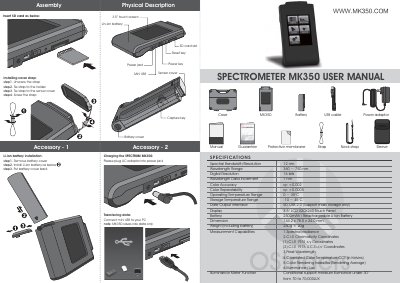
This document serves as the user manual for the SPECTRUM MK350 portable spectrometer. It provides physical descriptions of the device and its accessories, including the battery, USB cable, and protective case. The guide details the assembly process, such as installing the neck strap and the Li-ion battery, as well as instructions for transferring data to a PC via the Mini USB port.
| Wavelength Range | 360 ~ 750 nm |
|---|---|
| Digital Resolution | 16 bits |
| Color Accuracy | xy: ±0.002 |
| Color Repeatability | xy: ±0.0005 |
| Display | 3.5" LCD 320X240 Touch Panel |
| Battery | 2500mAh / Reachargeable Li-ion Battery |
| Dimension | 144.2 x 78.0 x 24.0 mm |
| Weight (Including battery) | 250g ± 20g |
Remove the battery cover, install the Li-ion battery as shown in the diagram, and then put the battery cover back.
Yes, the device supports saving data into an SD card, but it saves raw data only.
The available modes are SIMPLE, SPECTRUM, CIE1931, and CIE1976.