
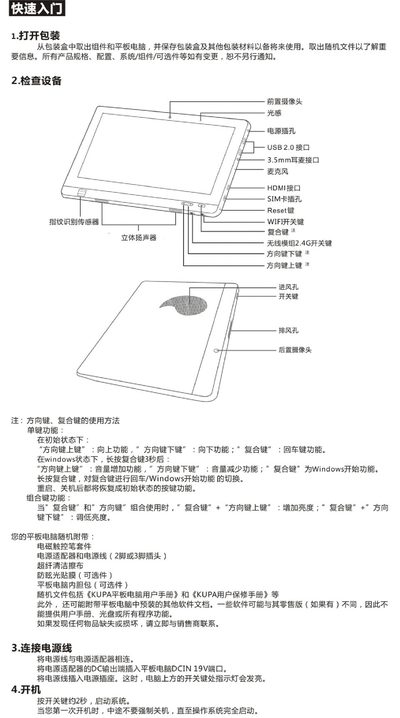
This guide provides step‑by‑step instructions for powering on, installing Windows 7, and configuring network connections on the KUPA X11 tablet. It also includes safety precautions, maintenance tips, and hardware specifications.
The document details driver updates, Wi‑Fi and 3G connectivity, system configuration, and warranty information, helping users get the tablet up and running quickly and safely. This manual is written in Chinese.
| Operating System | Microsoft Windows 7 (pre‑installed) |
|---|---|
| Processor | Intel 1.5 GHz tablet‑specific CPU |
| Storage | 64 GB or 128 GB SSD |
| Display | 10.1‑inch, 1366 × 768 LED backlit |
| Battery | 53 Whr polymer lithium battery |
| Weight | ≈950 g |
| Dimensions | 272 × 186 × 14.8 mm |
| USB Ports | 2 × USB 2.0 |
| HDMI Port | HDMI (supports 1080p video) |
| Audio Jack | 3.5 mm headset/mic combo |
Power off the tablet, connect a Windows 7 USB installer and press the power button, then quickly press F12 repeatedly until the boot manager appears and follow the on‑screen steps.
Open the task‑bar, select the Wi‑Fi icon, choose the desired network, click “Connect”, and enter the password if prompted.
The tablet uses a 53 Whr polymer lithium battery.