
Rain Bird EZ1-D Controller Programming and Installation Manual

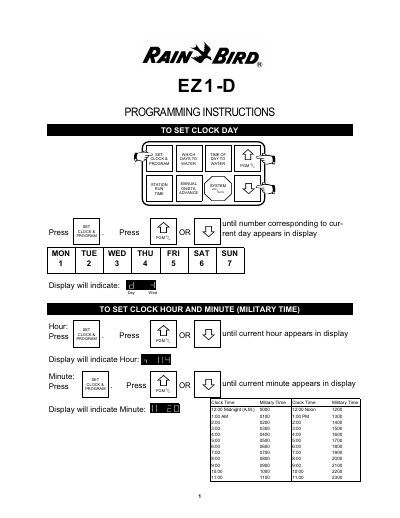
This document provides EZ1-D programming instructions, including setting the clock and program, setting the hour and minute, and calling up a program.

Rain Bird EZ1-D Controller Programming and Installation Manual - cover page
Brand
RAINBIRD
Category
Other
Document type
User Manual
Language
English
Pages
7
File format
PDF
File size
2.2 MB
Published
09 August, 2012
Updated
28 September, 2023
MD5 checksum
03046395E47CC29C68930F04B2B6204F

About this manual

The Rain Bird EZ1-D is a programmable irrigation controller designed to manage watering schedules for lawns and shrubs. It features two independent programs (A and C) allowing for flexible scheduling on different days of the week. The device supports up to six stations and includes a rain shut-off feature to prevent watering during precipitation.

What's inside

  • Set Clock Day
  • Set Clock Hour and Minute
  • Call Up a Program
  • Set Days of the Week
  • Set Time of Day to Start Watering
  • Set Watering Time for Each Station
  • Manual Watering
  • Rain Shut-Off
  • Transformer Connection
  • Troubleshooting

Specifications

Voltage60 HZ (USA: 220, 240, 260 V) and 50 HZ (European)
Battery9V
Stations6

Frequently asked questions

How do I set the clock on the EZ1-D?

Press SET CLOCK & PROGRAM, then use the arrow keys to select the current day, hour, and minute in military time.

What does it mean if the last digit blinks?

The controller is in Rain Shut-Down mode and scheduled watering cycles will not occur.

Download PDF (2.2 MB)

More RAINBIRD Manuals


View all RAINBIRD manuals →