
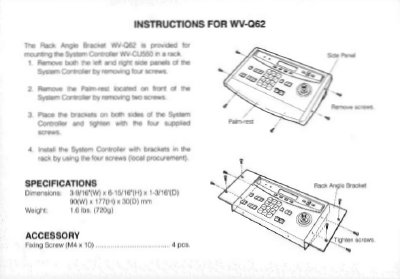
This short installation sheet from Panasonic's Broadcast & Television Systems Company explains how to mount the System Controller in a rack using the WV-Q62 brackets. It walks through removing the feet and right side panel of the System Controller, taking off the bracket plate, attaching the brackets to both sides of the unit with the supplied screws, and then installing the controller with brackets in the rack using four locally procured screws.
The document also gives specifications for the bracket, including dimensions and weight, and includes an accessory section. The last page lists Panasonic closed circuit video equipment division offices in the United States, Canada and Puerto Rico.
| Dimensions | 3.0/10" (W) x 1-16/16" (H) x 1-9/16" (D); 177 (W) x 90 (D) mm |
|---|---|
| Weight | 1.6 lbs (720 g) |
It is installed in the rack using four screws that are procured locally.
The feet and the right side panel are removed by taking out the screws.