
Panasonic WV-Q52A Rack Mount Bracket Installation Guide


Panasonic WV-Q52A Rack Mount Bracket Installation Guide - cover page
Brand
Panasonic
Category
Monitoring Equipment
Document type
Installation Guide
Language
English
Pages
2
File format
PDF
File size
523 KB
Published
09 August, 2012
Updated
17 August, 2012
MD5 checksum
CA190B0840118CCE8E24241A626C6D00

About this manual

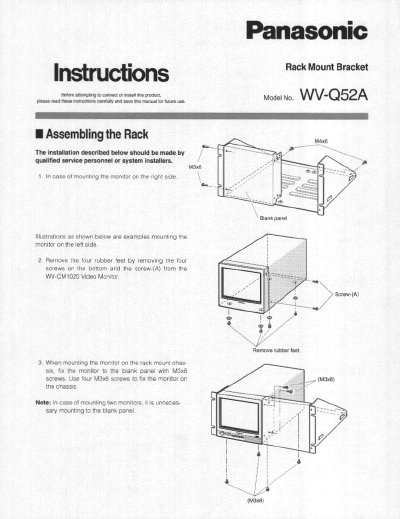
This document provides instructions for assembling and installing the rack mount bracket for the Panasonic WV-Q52A video monitor. It details the removal of rubber feet, fixing the monitor to the chassis, and securing the assembly to a rack. Qualified service personnel or system installers should perform the installation.

What's inside

  • Assembling the Rack
  • Monitor Installing on the Rack
  • Cautions
  • Specifications
  • Standard Accessories

Specifications

Dimensions480(W) x 221(H) x 308(D) mm
Weight2.7 kg (6 lbs)

Frequently asked questions

What is the maximum recommended temperature for the rack?

The temperature in the rack must be kept within +50°C (122°F).

What are the dimensions of the WV-Q52A?

The dimensions are 480(W) x 221(H) x 308(D) mm.

What is the weight of the WV-Q52A?

The weight is 2.7 kg (6 Ibs).

Download PDF (523 KB)

More Panasonic Manuals


View all Panasonic manuals →