
Drive Steel Crutches Push-Button/Adjustable Fully Assembled User Manual

This PDF file provides detailed information about Steel Crutches 10406 and 10408, including weight, size, material, place of origin, etc.
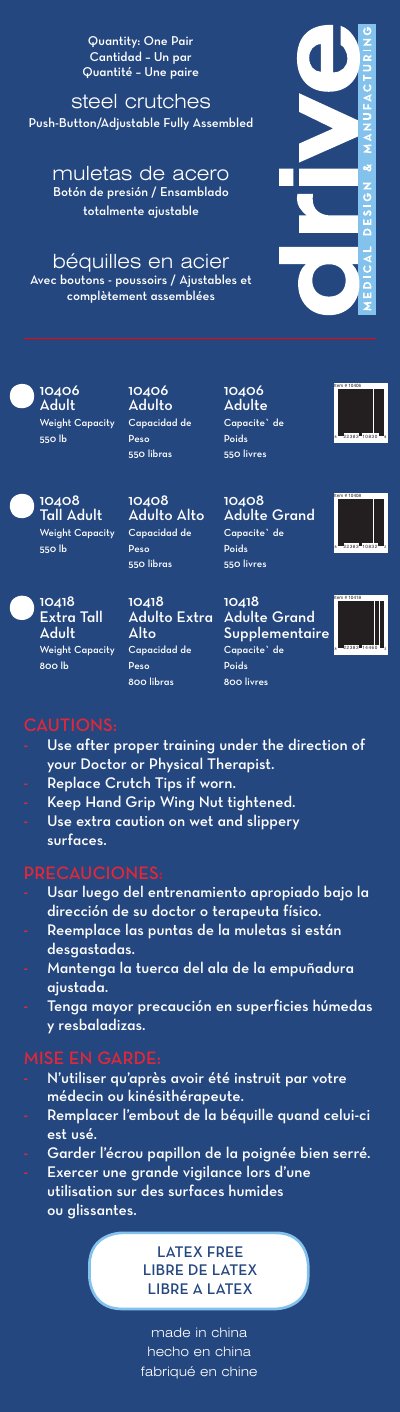

Drive Steel Crutches Push-Button/Adjustable Fully Assembled User Manual - cover page
Brand
Drive
Category
Professional medical equipment
Document type
User Manual
Language
English
Pages
2
File format
PDF
File size
132 KB
Published
07 August, 2012
Updated
30 September, 2023
MD5 checksum
15357AC28317F18A41BA4DC34C039A28

About this manual

This document provides instructions for the Drive Steel Crutches Push-Button/Adjustable Fully Assembled series. It covers three specific models: 10406 (Adult), 10408 (Tall Adult), and 10418 (Extra Tall Adult), each with distinct weight capacities ranging from 550 to 800 lbs.

What's inside

  • Quantity
  • Weight Capacity
  • Use after proper training
  • Replace Crutch Tips
  • Keep Hand Grip Wing Nut tightened
  • Use extra caution on wet surfaces
  • Height adjustment
  • Handgrip adjustment
  • Safety Check
  • Crutch fitting position

Specifications

MaterialSteel
Latex StatusLatex Free
OriginChina

Frequently asked questions

How do I adjust the height of the crutches?

Press both push-buttons, rotate the foot-piece, and pull down until the desired patient height is obtained.

How should the handgrip be adjusted?

Adjust the handgrip to fit an approximate 10-inch bend at the patient's elbow.

What is the safety check procedure?

Confirm the patient can lean forward comfortably while resting on the underarm supports and that push-buttons are firmly in place.

Download PDF (132 KB)

More Drive Manuals


View all Drive manuals →