
This manual introduces the AD5449 evaluation board, including its features, applications, and usage methods.
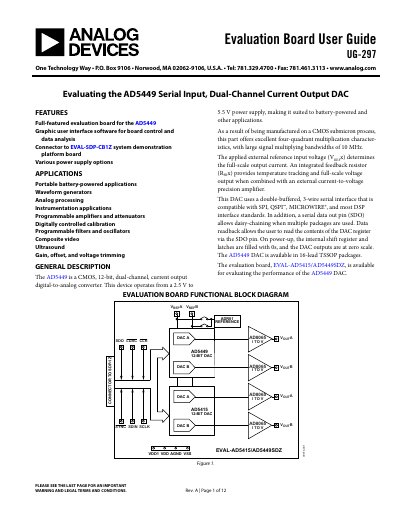
The document provides a user guide for the EVAL-AD5415/AD5449SDZ evaluation board, which features an AD5449 serial input dual-channel current output DAC and an AD5415 DAC. The kit includes PC software with a graphic user interface for controlling the devices and analyzing data.
The guide details how to install the required drivers and LabVIEW software on Windows systems. It explains how to connect the evaluation board to the EVAL-SDP-CB1Z system demonstration platform via USB and describes the procedures for operating the board in both asynchronous and synchronous modes using the provided software.
| DAC Type | CMOS, 12-bit, dual-channel, current output digital-to-analog converter |
|---|---|
| Power Supply Range | 2.5 V to 5.5 V |
| Signal Multiplying Bandwidth | 10 MHz |
| Interface Compatibility | SPI, QSPI, MICROWIRE, and most DSP interface standards |
| Package Type | 16-lead TSSOP |
The evaluation kit includes a CD-ROM with self-installing PC software to control the DAC and write code to the device.
Users can write a 12-bit word in hexadecimal format to either DAC A, DAC B, or both via the CONTROL FUNCTIONS panel.