
Funai F42PDME Plasma Display User Manual

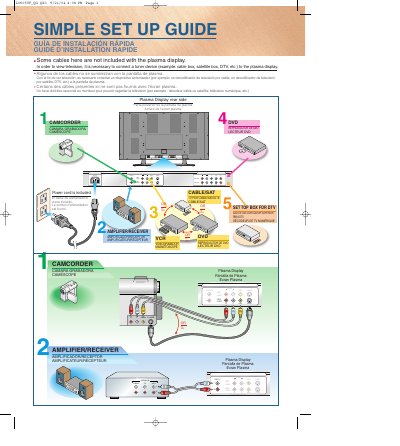
This document is a simple setup guide that introduces how to connect different devices, including TV sets, DVD players, and cameras.

Funai F42PDME Plasma Display User Manual - cover page
Brand
FUNAI
Document type
User Manual
Language
English
Pages
82
File format
PDF
File size
2.3 MB
Published
11 July, 2012
Updated
30 September, 2023
MD5 checksum
4C777FC3F807793D167FF8F54612E7FA

About this manual

The Funai F42PDME is a plasma display that requires connection to an external video source such as a cable box, satellite receiver, or DTV tuner to view television. The unit comes with a power cord but does not include other cables like HDMI or component cables; users must connect these separately from their devices.

What's inside

  • IMPORTANT SAFETY INSTRUCTIONS
  • SUPPLIED ACCESSORIES
  • REMOTE CONTROL
  • BASIC OPERATIONS
  • SELECTING THE INPUT SIGNAL
  • CHANGING THE ASPECT RATIO
  • NAVIGATING THE SET UP MENU
  • PICTURE SELECT
  • SETTING THE SCREEN SAVER
  • TROUBLESHOOTING GUIDE

Specifications

Product TypePlasma Display
Model NumberF42PDME

Frequently asked questions

What external device is required to view television?

You must connect a tuner device such as a cable box, satellite box, or DTV.

Is the power cord included with the unit?

Yes, the power cord is included.

Can I use any wall mount for this display?

No, it should only be used with the Sanus Systems Model VMPL Wall Mount to ensure stability and safety.

Download PDF (2.3 MB)

More FUNAI Manuals


View all FUNAI manuals →