
Pioneer AVIC-U220 Add-On Navigation System Quick Start Guide

This quick start guide introduces you to the basic functions of this navigation system. For details, please refer to the operation manual.
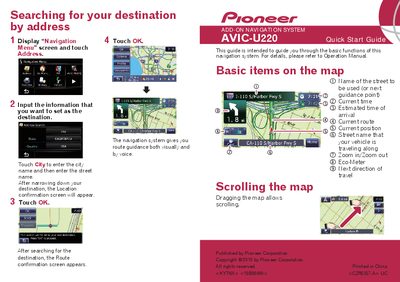

Pioneer AVIC-U220 Add-On Navigation System Quick Start Guide - cover page
Brand
Pioneer
Category
Car Accessories
Document type
Quick Start Guide
Language
English
Pages
2
File format
PDF
File size
790 KB
Published
09 July, 2012
Updated
30 September, 2023
MD5 checksum
C941DD45F9C86D74520041EC12150A81

About this manual

The document serves as a quick start guide for the Pioneer AVIC-U220 Add-On Navigation System. It explains how to search for destinations by address or point of interest (POI) using the navigation menu, including steps to input city and street names. The guide also describes basic map features such as zooming, scrolling, and identifying route information like estimated arrival time and current position.

What's inside

  • Searching for your destination
  • Basic items on the map
  • Scrolling the map
  • Switching the screen
  • Setting the volume of the route guidance

Frequently asked questions

What does this navigation system provide for drivers?

The system provides route guidance both visually and by voice.

How can a user switch between the receiver and navigation screens?

Press the MODE button of the AV receiver to switch between the AV receiver screen and the navigation screen.

What is required to launch applications downloaded to an SD memory card?

You must use the utility program AVIC FEEDS to launch these applications.

Download PDF (790 KB)

More Pioneer Manuals


View all Pioneer manuals →