
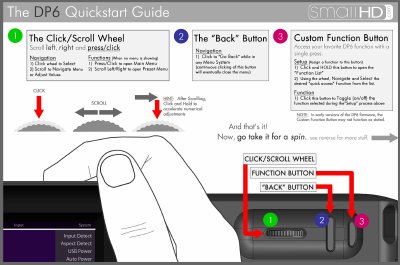
This document provides a brief overview of the SmallHD DP6 monitor's control interface. It explains how to use the Click/Scroll Wheel and Function Button for navigating menus, adjusting values, and accessing custom functions without needing deep menu diving.
The guide also details specific features such as Image Control (contrast, brightness), Advanced settings like CustomScale for video signal manipulation, and the Preset Menu system for saving configurations. Additionally, it includes critical instructions for updating the device software via USB and lists technical specifications regarding power input and connector types.
| Voltage Input Range | 5-17vDC |
|---|---|
| Barrel Connector Specs | 5.5mm OD / 2.1mm ID, center pin positive |
| USB Power | 5yv / 0.5A (when activated in System menu) |
| HDMI Connector Style | Type A connector style (standard) |
The device will need to be sent in for repair, and associated shipping and repair costs are not covered by the warranty.
The device accepts a DC voltage input ranging from 5 to 17 volts.
The barrel connector has a 5.5mm outer diameter and a 2.1mm inner diameter.
If the device is powered off during an update, it must be sent in for repair.