
This document introduces troubleshooting methods for UNITY1/UNITY2 cold traps
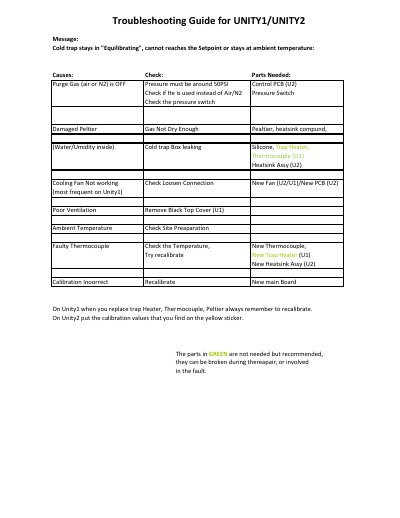
The document serves as a troubleshooting reference for the UNITY1 and UNITY2 systems. It details specific fault conditions such as the cold trap remaining in 'Equilibrating' mode or failing to reach the setpoint, offering causes and required parts for repair.
Additionally, it covers scenarios where heated zones require excessive power (over 75%) to increase temperature, displaying messages like 'name of the zone not heating'. The guide also addresses errors related to oven temperatures, valve heaters, transfer lines, and system readiness states during GC cycles.
Causes include a damaged Peltier, cooling fan failure, poor ventilation, ambient temperature issues, or a faulty thermocouple.
It indicates that a heated zone requires more than 75% of power to increase the temperature.
Parts may include a new Thermocouple, Heatsink Assy, Heater, or Control PCB depending on the specific fault.